Showing posts with label Blogging Tips. Show all posts

Stuff You Need For A Great & Profitable Website

on


The internet is a growing and booming medium for aspiring entrepreneurs. However with all of the competition, it takes a little more than a basic website to profit. To build a thriving and profitable website, you’ll need a few key ingredients. 

Add Social bookmarking elements after each blog post(includes Stumbleupon,Twitter,Facebook)

on

Update:-Facebook Icon Added
Social Bookmarking Icons for Blogger - The social bookmarking blogger widget will add neat social bookmarking icons below each of your posts so that your readers can bookmark your posts at various social bookmarking sites like digg,stumble,magnolia,delicious,
google,yahoo etc.. This is the updated version of my previous post post on the same.. in this i have added a new stumble upon button.If you use this you will get the bookmarking icons after each blog post as you see on my blog here . To get this working on your blog do the following steps.. 

How to Add Recent Comments Widget to Blogger!

on


Recent Comments widget/plugin makes your blog more ‘visitor-friendly‘.
This post explains how you can add Recent Comments widget to your blogger blogs easily!
Just do the following simple steps:

  1. Go to Blogger Layout page
  2. Click Add a Gadget where you want to add Recent Comments
  3. Select Feed from the list:
    Add Recent Comments Widget to Blogger!
  4. Add your blog’s comments feed as:
    http://YOUR BLOG.com/feeds/comments/default
    Add Recent Comments Widget to Blogger!
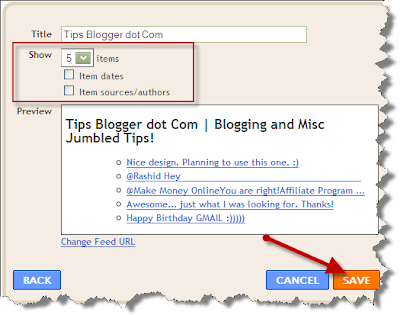
  5. Now choose the number of recent comments to display:
    Add Recent Comments Widget to Blogger!
  6. Click Save. Finished!
Have a great blogging!

increase Visitors to your Website|A-Z Tips to Increase Site Visitors| How to increase visitors to your website

on

We said A-Z and we meant it. Here are 26 sure-fire ways to increase web traffic and site visitors to your website. Use some or all of them, and let us know which ones worked best for you.


How To Increase Website Traffic Best SEO Tips And Tricks | Search Engine Optimization| How To direct Traffic to your Blog

on


Website Optimization:-

1. Customize your 404 error page. Whether you like it or not people will get 404 errors on your website. Maybe they will misspell your URLs, maybe someone will link to an inexistent page inside your website, and so on. If you use a normal 404 error page, visitors will simply move on to another website. If you customize your 404 error page to include some useful links, however, you’ll channel these visitors to other parts of your site, thus increasing your traffic.
2. Interlink your pages. This strategy will increase your traffic in two ways. First of all it will allow your visitors to explore your website more easily, increasing the number of pages views per visit. Secondly, it will also improve your search

5 Tips To Increase Your Adsense Revenue

on


Bloggers can make cash in with Google’s AdSense network. Instead of posting blinking lights, cheap animation and a bobbing and bouncing monkey (or the paper football, although I totally rock at that one) Google matches vertical or horizontal blocks of text with the content of the web page. The ads don’t blink or jump around. Instead, they match or relate to the topic at hand, so the reader isn’t seized with the immediate need to get it off the screen right now no matter what it costs.
Traffic goes up, income goes up. Making money on the Internet – it may be the World Wide Web’s Holy Grail. Still, despite the simplicity, there are several steps savvy bloggers can take to give AdSense added oomph.

How to Avoid Duplicate Content in Your Blog

on


You probably know by now that Google is taking serious measure to rid it's search engine result pages from duplicated content. It is frustrating to see MFA pages when you are doing your search. These MFA pages used scripts to publish other's articles and blogs. These are duplicate content.

Google, in doing so, also penalizes websites that have different URLs pointing to the same page.

How to not start link building for a site - mistakes in seo

on


All market is full with lots of tools that promise top 10 positions in Google,100000 backlinks in seconds and other cracks.
I will give you a list of things to NOT to do in a link building strategie.
1) Do not submit your site to more than 50 directories in a month.This are types of directories where are you sure your  site will appear.
Submit to more and you will get the sandbox effect upon your site.

How To Get Indexed Really Fast? Socialmarker, Socialposter

on


The basics are the same as always, to get your site or article indexed by a search engine as fast as possible you need quality links pointing to your site/article. Google often visits quality sites that hold quality links and if a link to your site happens to be there Google will follow it and Oooops stumble upon your site and index it.
It used to be hard for someone who was completely new to internet to get his site indexed. You had no other sites you could put your link on so you had to beg your friends or even people you dont know to give you a link, or you submitted your site to Google and hoped for the best or you ended buying links.
Today this is in the past. All you need to do is to submit your site to as many social posting sites as you can. If your site is good and usefull other people might bookmart it to and add more quality to the link but even if they don’t your site will still be indexed pretty darn quick.

Top three ways to generate free website traffic

on

There is one hard and fast rule in generating income with your site: A constant flow of website traffic. If no one goes to your website, it hardly bares a chance of making any money. BUT, it doesn't take a ton of cash to generate targeted traffic.Here are the top 3 ways to generate free traffic to your website.

1) Exchange Links
This is a very effective method. Just about every webpage has at least one outbound link on it.  Most site owners are willing to exchange links with another related site.  A major prerequisite in trading links with other websites is having the same niche. 

10 Tips to Build Blogger Blogspot Site Traffic

on


This article discusses 10 easy ways Blogger (Blogspot) Bloggers can build site traffic and in many cases improve SEO - search engine optimization. By implementing these steps you will improve the likelihood of your site ranking more highly in search engine results of major search engine players Google, Yahoo and MSN and as a result increase the number of visitors accessing your site.

10 Easy SEO Tips for Blogspot Bloggers to Improve Search Engine Rankings

1. Make Your Title Tags Search Engine Friendly
One of the most important tweaks necessary for Blogspot Blogs is theadjustment of the title tags of your website because Blogger.com by default has not optimized these for search engines. To prove this point navigate to an individual post on your blog and you will see that the blogname appears first in the title bar at the top of your browser followed by the post name. As search engines place greater value on the first words of an entry this puts your site at a disadvantage in search engine results. Fortunately it is easy to reverse the blog name and the post name with a simple tweak. For instructions on how to change the order of these title tags please refer to my article entitled Adjust Blogger Title Tags to Improve SEO

Add Google Analytics to a Blogger Blog

on

If you are new to blogging at Blogger.com you might not be aware that tracking and statistics software can be linked to your site to give you details about your visitors. The process of adding a free tracking program such as Google Analytics is relatively straightforward. By following the simple steps below you will gain access to very useful data about the kind of traffic accessing your site. This will help you grow your site and target your content to meet the needs of your visitors.

Steps to Add Google Analytics to Your Blogger Blog

Add a Recent Comments Feed to Blogger Sidebar

on


When you add a recent comments widget to a Blogger blog (Blogspot blog) using your Blogger comments feed you will encourage visitors to comment on your blog and hopefully improve blog traffic blog.

It only takes a couple of minutes to add a Recent Comments widget to Blogger. It is also easy since it requires no editing of your Blogger template. This Blogger tutorial assumes limited technical knowledge of Blogger and is mostly aimed at new bloggers and beginners although it is suitable for any Blogspot blogger looking to increase action on their blog.


Below I will take you through the steps of adding a feed widget to the Blogger sidebar so that the Blogger default comments feed will be displayed there. Equally you could add this widget to the footer if you prefer.

I am going to show you two different widgets to add Recent Comments to your blog. Which you choose is up to you and largely depends on how many comments you wish to display. 

Submit Your Blogspot Blog Sitemap to Google

on


I often see questions from beginner bloggers in forums about adding a sitemap of their Blogspot blog to Google. This is surprisingly easy to do although there is virtually no documentation about how to go about it. That's why I have written this tutorial with the beginner blogger in mind. It provides a set of simple step by step instructions to guide you through the process of adding a sitemap to Google. By following this tutorial you will have your Blogspot sitemap added to Google in less than 5 minutes flat.

Why Add a Sitemap to Google?
As Google owns the Blogger.com platform most sites are indexed by Google automatically. However, you might find as I have done that this process doesn't always run as smoothly or as quickly as you might like. Manually adding a sitemap to Google has some distinct advantages:

Improve Traffic To Your Blog

on

It is very important as a new blogger that you gain good readership and commentators. It is only possible if you display your blogs to others. As always, one easy method that you can adopt to increase your traffic is to use sites like EasyHits4U(Review about this site), TrafficSwarm, etc.. The most important thing that you need to do in order to increase the traffic to your blog is to submit your blog/site to various Search Engines.

I found the below site that will submit your site to various search engines. However, I suggest you to index your blog individually with Google. You may visit Google WebMaster Tools for indexing your blog with Google. Though, Google automatically recognizes your blog and keywords if your content is unique, it is still better to index your blog separately with Google. I will soon let you know how to index your blog with Google in my later posts.


Submit Your Site To The Web's Top 50 Search Engines for Free!

How to create a sitemap

on

A sitemap of a website is similar to the table of contents of a book.  Sitemaps are important because it guides web surfers to the particular part of the website they have a point of interest in. With it they would save time following links and get right to the point instead.

Sitemaps are also where search engines look at if somebody is looking for a particular keyword or phrase. If you have a site map, you can most likely be searched.

Creating a sitemap, now with software technology surging in, is relatively easier than before.  You need not be a programming guru to be one. All need is a notepad, a program editor, and some patience. Here’s how you do it:

Create the listing on a notepad.

It doesn’t necessarily have to be a notepad. Any word processing program will do. First off, make sure to type in all the parts and pieces of your website. Include all pages and all links you have. Create it as if you listing the contents of your book. Make a draft first. You’re sure no to miss something out this way.

Create a new page for your sitemap.

5 Tricks to Use Keywords in Your Blog Posts

on

One of the biggest sources of traffic to your blog will be search engines, particularly Google.  You can boost the traffic that comes to your blogs from search engines by implementing search engine optimization (SEO) tricks into your blog layout and writing.  You can get started by doing some keyword research and determining which keywords are likely to drive the most traffic to your blog.  Then focus on incorporating those keywords into your blog posts using the tricks below.


1. Use keywords in your blog post title.
One of the best ways to incorporate keywords into your blog posts is to use them in your blog post titles.  However, don't sacrifice a title's ability to motivate people to click through and read your entire blog post.  Learn 3 tips to write great blog post titles.

3 Steps to Write Great Blog Post Titles

on


Writing blog post  titles that get attention and traffic is a unique form of writing, because you write blog post titles for multiple reasons. First, you want people to be intrigued enough to feel compelled to read the actual blog post. Second, you don't want to trick anyone by writing a title that is irrelevant to your blog post content. Third, you want your blog post to help drive search engine traffic, so you need to focus on keywords when you come up with your blog post titles. That's a hefty list, but you can meet all three goals when you write blog post titles following the steps below.

Boost Blog Traffic with Long Tail Search Engine Optimization

on


Most bloggers who analyze their blog traffic statistics learn that the majority of visitors to their blogs come directly from keyword searches on popular search engines like Google, Yahoo! and Bing. Many of those bloggers spend a lot of time doing keyword research to identify the keywords that people are actively typing into their preferred search engines to find content similar to what is published on those blogs. The reason is simple. Once you know the keywords that people use in order to find content like yours, you can revise your existing content and write new content that actually uses those keywords in order to capture some traffic from those keyword searches.

Top 4 Keyword Research Tools

on


If you want to increase traffic to your blog, then search engine optimization (SEO) should be important to you. In order to optimize your blog for keyword search traffic, you need to start by doing some keyword research and long-tail SEO research to learn the keywords and keyword phrases people are using to find content like that offered on your blog. The 4 Web sites below can help you conduct keyword research. Once you find the keywords people are using to find content like yours, you can target those keywords in your blog posts and content (follow the link to learn the top 10 SEO tips.